
【通过docker容器搭建lamp架构的流程】目录
- 1. 拉取centos镜像
- 2. 构建nginx镜像
- 3. 构建mysql镜像
- 4. 构建php镜像
- 5. 配置lnmp
1. 拉取centos镜像[root@localhost ~]# docker pull centosUsing default tag: latestlatest: Pulling from library/centosa1d0c7532777: Pull complete Digest: sha256:a27fd8080b517143cbbbab9dfb7c8571c40d67d534bbdee55bd6c473f432b177Status: Downloaded newer image for centos:latestdocker.io/library/centos:latest[root@localhost ~]# docker imagesREPOSITORYTAGIMAGE IDCREATED SIZEcentoslatest5d0da3dc97642 months ago231MB[root@localhost ~]#
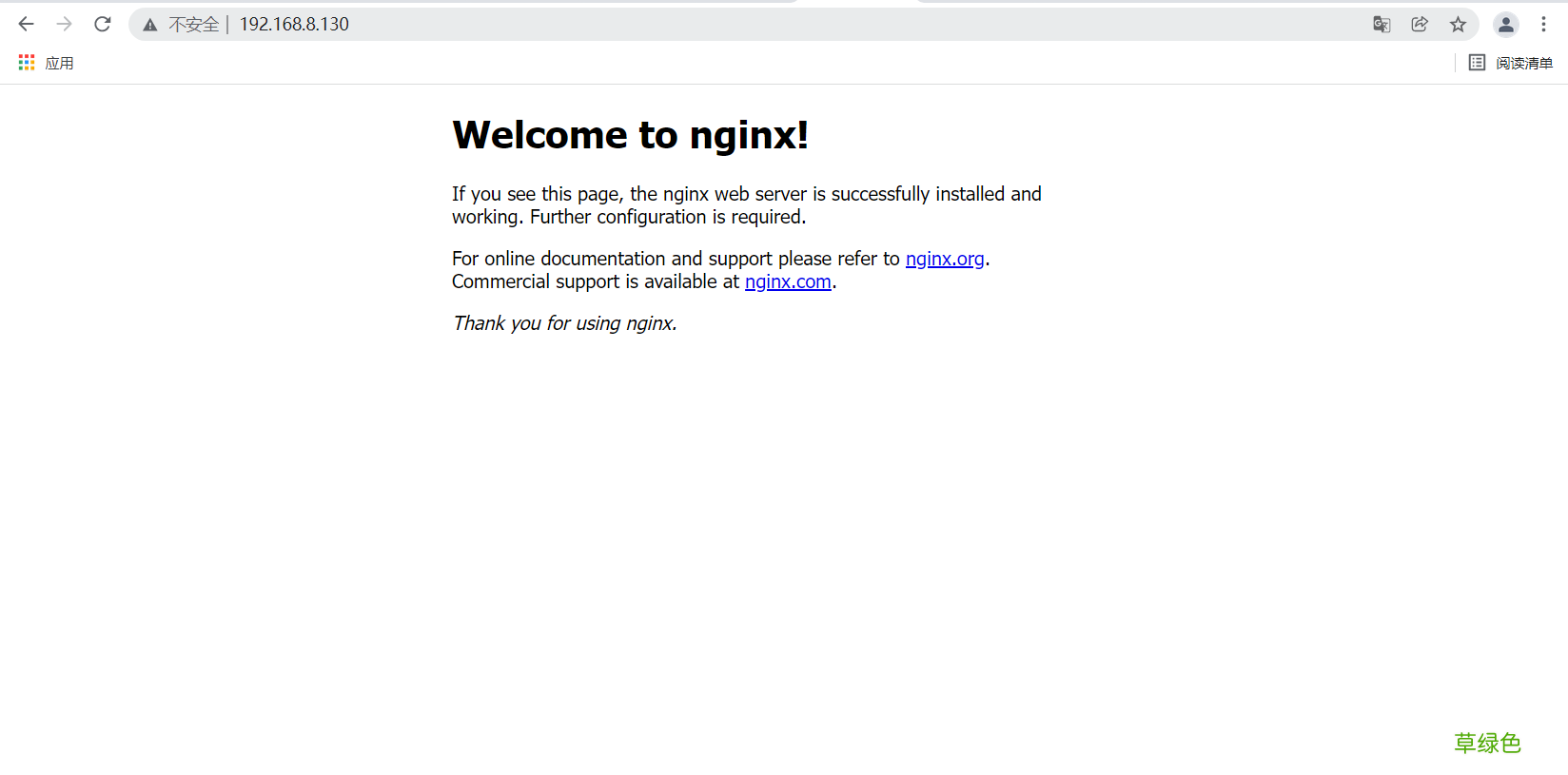
2. 构建nginx镜像[root@localhost ~]# docker run --name nginx -it centos[root@522006030d19 /]# useradd -r -M -s /sbin/nologin nginx[root@522006030d19 /]# yum -y install pcre-devel pcre gcc gcc-c++ openssl-devel zlib zlib-devel make vim wget openssl openssl-devel gd-devel[root@522006030d19 /]# mkdir -p /var/log/nginx[root@522006030d19 /]# chown -R nginx.nginx /var/log/nginx[root@522006030d19 /]# cd /usr/src/[root@522006030d19 src]# wget https://nginx.org/download/nginx-1.20.1.tar.gz[root@522006030d19 src]# tar xf nginx-1.20.1.tar.gz [root@522006030d19 src]# cd nginx-1.20.1[root@522006030d19 nginx-1.20.1]# ./configure \> --prefix=/usr/local/nginx \> --user=nginx \> --group=nginx \> --with-debug \> --with-http_ssl_module \> --with-http_realip_module \> --with-http_image_filter_module \> --with-http_gunzip_module \> --with-http_gzip_static_module \> --with-http_stub_status_module \> --http-log-path=/var/log/nginx/access.log \> --error-log-path=/var/log/nginx/error.log[root@522006030d19 nginx-1.20.1]# make -j $(grep 'processor' /proc/cpuinfo | wc -l) && make install[root@522006030d19 nginx-1.20.1]# echo 'export PATH=/usr/local/nginx/sbin:$PATH' > /etc/profile.d/nginx.sh[root@522006030d19 nginx-1.20.1]# source /etc/profile.d/nginx.sh[root@522006030d19 nginx-1.20.1]# nginx [root@522006030d19 nginx-1.20.1]# ss -antlStateRecv-QSend-QLocal Address:PortPeer Address:PortProcessLISTEN01280.0.0.0:800.0.0.0:* [root@522006030d19 nginx-1.20.1]#[root@522006030d19 nginx-1.20.1]# echo "daemon off;" >> /usr/local/nginx/conf/nginx.conf[root@522006030d19 nginx-1.20.1]# tail -1 /usr/local/nginx/conf/nginx.confdaemon off;[root@522006030d19 nginx-1.20.1]# //打开另外一个终端[root@localhost ~]# docker commit -c 'CMD ["/usr/local/nginx/sbin/nginx"]'-p nginx pengyudong/nginx:v1sha256:2153a12060f6cca88646f285a1ae2af2a94c0d489ad8393f931d29c8fdd8af6e[root@localhost ~]# docker imagesREPOSITORYTAGIMAGE IDCREATEDSIZEpengyudong/nginxv1 2153a12060f627 seconds ago576MBcentoslatest5d0da3dc97642 months ago231MB[root@localhost ~]# [root@localhost ~]# docker psCONTAINER IDIMAGECOMMANDCREATEDSTATUSPORTSNAMES[root@localhost ~]# docker ps -aCONTAINER IDIMAGECOMMANDCREATEDSTATUS PORTSNAMES522006030d19centos"/bin/bash"14 minutes agoExited (0) 38 seconds agonginx[root@localhost ~]# docker rm 522006030d19522006030d19[root@localhost ~]# docker runpengyudong/nginx:v1[root@localhost ~]# docker psCONTAINER IDIMAGECOMMANDCREATEDSTATUSPORTSNAMES9c129a20e7c7pengyudong/nginx:v1"/usr/local/nginx/sb…"About a minute agoUp 2 secondsblissful_perlman[root@localhost ~]# docker inspect 9c129a20e7c7......省略N行"Gateway": "172.17.0.1","GlobalIPv6Address": "","GlobalIPv6PrefixLen": 0,"IPAddress": "172.17.0.2",.....省略N行[root@localhost ~]# curl 172.17.0.2Welcome to nginx!body { width: 35em; margin: 0 auto; font-family: Tahoma, Verdana, Arial, sans-serif;}Welcome to nginx!If you see this page, the nginx web server is successfully installed andworking. Further configuration is required.
For online documentation and support please refer tonginx.org.
Commercial support is available atnginx.com.
Thank you for using nginx.
[root@localhost ~]#
3. 构建mysql镜像[root@localhost ~]# docker run --name mysql -it centos[root@16256ee64b9e /]# cd /usr/src/[root@16256ee64b9e src]# lsdebugkernels[root@16256ee64b9e src]# //开启另外一个终端[root@localhost src]# lsdebugkernelsmysql-5.7.34-linux-glibc2.12-x86_64.tar.gz[root@localhost ~]# cd /usr/src/[root@localhost src]# docker cpmysql-5.7.34-linux-glibc2.12-x86_64.tar.gz mysql:/usr/src/[root@16256ee64b9e src]# lsdebugkernels mysql-5.7.34-linux-glibc2.12-x86_64.tar.gz[root@16256ee64b9e src]# [root@16256ee64b9e src]# yum -y install ncurses-devel openssl-devel openssl cmake mariadb-devel ncurses-compat-libs libaio numactl[root@16256ee64b9e src]# useradd -r -M -s /sbin/nologin mysql[root@16256ee64b9e src]# tar xf mysql-5.7.34-linux-glibc2.12-x86_64.tar.gz [root@16256ee64b9e src]# mv mysql-5.7.34-linux-glibc2.12-x86_64 /usr/local/mysql [root@16256ee64b9e src]# cd /usr/local/[root@16256ee64b9e local]# lsbinetcgamesincludeliblib64libexecmysqlsbinsharesrc[root@16256ee64b9e local]# chown -R mysql.mysql /usr/local/mysql [root@16256ee64b9e local]# mkdir /opt/data[root@16256ee64b9e local]# chown-R mysql.mysql /opt/data [root@16256ee64b9e local]# /usr/local/mysql/bin/mysqld --initialize-insecure --user=mysql --datadir=/opt/data2021-12-06T02:53:34.095554Z 0 [Warning] TIMESTAMP with implicit DEFAULT value is deprecated. Please use --explicit_defaults_for_timestamp server option (see documentation for more details).2021-12-06T02:53:35.482793Z 0 [Warning] InnoDB: New log files created, LSN=457902021-12-06T02:53:35.506011Z 0 [Warning] InnoDB: Creating foreign key constraint system tables.2021-12-06T02:53:35.562063Z 0 [Warning] No existing UUID has been found, so we assume that this is the first time that this server has been started. Generating a new UUID: b4aa24d8-563f-11ec-80a8-0242ac110003.2021-12-06T02:53:35.562798Z 0 [Warning] Gtid table is not ready to be used. Table 'mysql.gtid_executed' cannot be opened.2021-12-06T02:53:35.979249Z 0 [Warning] CA certificate ca.pem is self signed.2021-12-06T02:53:36.217615Z 1 [Warning] root@localhost is created with an empty password ! Please consider switching off the --initialize-insecure option.[root@16256ee64b9e local]# [root@16256ee64b9e local]# echo 'export PATH=/usr/local/mysql/bin:$PATH' > /etc/profile.d/mysql.sh[root@16256ee64b9e local]# . /etc/profile.d/mysql.sh[root@16256ee64b9e local]# echo $PATH/usr/local/mysql/bin:/usr/local/sbin:/usr/local/bin:/usr/sbin:/usr/bin:/sbin:/bin[root@16256ee64b9e local]# cat > /etc/my.cnf <
[root@localhost ~]# docker ps
CONTAINER ID IMAGE COMMAND CREATED STATUS PORTS NAMES
ade839dc292e pengyudong/mysql:v1 “/scripts/start.sh” 12 minutes ago Up 12 minutes mysql-1
29007b1a67a8 pengyudong/nginx:v1 “/usr/local/nginx/sb…” 2 hours ago Up About an hour
[root@localhost ~]# docker exec -it mysql-1 /bin/bash
[root@29007b1a67a8 /]# ss -antl
State Recv-Q Send-Q Local Address:Port Peer Address:Port Process
LISTEN 0 128 0.0.0.0:80 0.0.0.0:*
LISTEN 0 80 *:3306 :
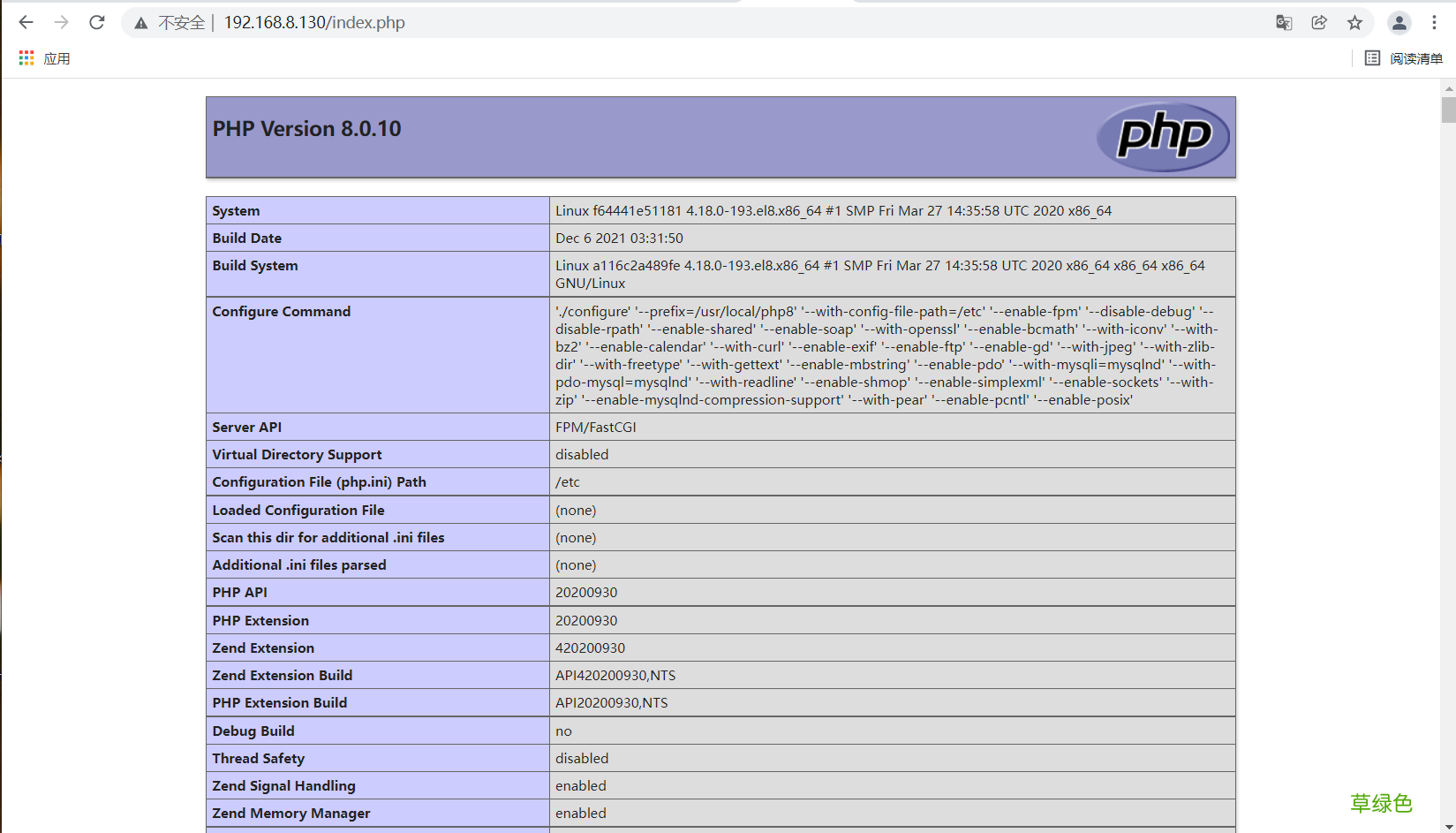
4. 构建php镜像[root@localhost ~]# cd /usr/src/[root@localhost src]# lsdebugkernelsmysql-5.7.34-linux-glibc2.12-x86_64.tar.gzphp-8.0.10.tar.gz[root@localhost src]# docker cp php-8.0.10.tar.gz php8:/usr/src/[root@a116c2a489fe src]# lsdebugkernels php-8.0.10.tar.gz[root@a116c2a489fe src]# yum -y install epel-release[root@a116c2a489fe src]# yum -y install sqlite-devel libzip-devel libxml2 libxml2-devel openssl openssl-devel bzip2 bzip2-devellibicu-devel libjpeg libjpeg-devel libpng libpng-devel openldap-devel pcre-devel freetype freetype-devel gmp gmp-devel readline readline-devel libxslt libxslt-devel onigurumagcc gcc-c++ make libcurl-devel[root@a116c2a489fe src]# yum -y install http://mirror.centos.org/centos/8-stream/PowerTools/x86_64/os/Packages/oniguruma-devel-6.8.2-2.el8.x86_64.rpm[root@a116c2a489fe src]# tar xf php-8.0.10.tar.gz [root@a116c2a489fe src]# cd php-8.0.10[root@a116c2a489fe php-8.0.10]# ./configure --prefix=/usr/local/php8\> --with-config-file-path=/etc \> --enable-fpm \> --disable-debug \> --disable-rpath \> --enable-shared \> --enable-soap \nable-exif\--enable-ftp \--enable-gd \--with-jpeg \--with-zlib-dir \--with-freetype \--with-gettext \--enable-mbstring \--enable-pdo \--with-mysqli=mysqlnd \--with-pdo-mysql=mysqlnd \--with-readline \--enable-shmop \--enable-simplexml \--en> --with-openssl \> --enable-bcmath \> --with-iconv \> --with-bz2 \> --enable-calendar \> --with-curl \> --enable-exif\> --enable-ftp \> --enable-gd \> --with-jpeg \> --with-zlib-dir \> --with-freetype \> --with-gettext \> --enable-mbstring \> --enable-pdo \> --with-mysqli=mysqlnd \> --with-pdo-mysql=mysqlnd \> --with-readline \> --enable-shmop \> --enable-simplexml \> --enable-sockets \> --with-zip \> --enable-mysqlnd-compression-support \> --with-pear \> --enable-pcntl \> --enable-posix[root@a116c2a489fe php-8.0.10]# make -j $(grep 'processor' /proc/cpuinfo | wc -l) && make install[root@a116c2a489fe php-8.0.10]# echo 'export PATH=/usr/local/php7/bin:$PATH' > /etc/profile.d/php.sh[root@a116c2a489fe php-8.0.10]# source /etc/profile.d/php.sh[root@a116c2a489fe php-8.0.10]# cp -f /usr/src/php-8.0.10/php.ini-production /etc/php.icp: overwrite '/etc/php.i'? yes[root@a116c2a489fe php-8.0.10]# cp -f /usr/src/php-8.0.10/sapi/fpm/init.d.php-fpm /etc/init.d/php-fpm[root@a116c2a489fe php-8.0.10]# chmod +x /etc/init.d/php-fpm[root@a116c2a489fe php-8.0.10]# cp -f /usr/local/php8/etc/php-fpm.conf.default /usr/local//php8/etc/php-fpm.conf[root@a116c2a489fe php-8.0.10]# cp -f /usr/local/php8/etc/php-fpm.d/www.conf.default /usr/local/php8/etc/php-fpm.d/www.conf[root@a116c2a489fe php-8.0.10]# mkdir /scripts[root@a116c2a489fe php-8.0.10]# vi /scripts/start.sh[root@a116c2a489fe php-8.0.10]# cat /scripts/start.sh #!/bin/bash/etc/init.d/php-fpm start/bin/bash[root@a116c2a489fe php-8.0.10]# chmod +x /scripts/start.sh [root@a116c2a489fe php-8.0.10]# /etc/init.d/php-fpm startStarting php-fpmdone[root@a116c2a489fe php-8.0.10]# ss -antlStateRecv-QSend-QLocal Address:PortPeer Address:PortProcessLISTEN0128127.0.0.1:90000.0.0.0:* [root@a116c2a489fe php-8.0.10]# [root@0e6298ebe47d php-8.0.10]#
[root@0e6298ebe47d php-8.0.10]# mkdir -p /var/www/html
[root@0e6298ebe47d php-8.0.10]# vi /var/www/html/index.php
[root@0e6298ebe47d php-8.0.10]# cat /var/www/html/index.php
[root@0e6298ebe47d php-8.0.10]#
[root@localhost src]# docker commit -c 'CMD ["/bin/bash","/scripts/start.sh"]' -p php8 pengyudong/php8:v1sha256:8ee4d3fb7bd27b0242cf096464932ff98fbc42d641d1f6b9cac7ddccb429f450[root@localhost src]# docker imagesREPOSITORYTAGIMAGE IDCREATEDSIZEpengyudong/php8v1 8ee4d3fb7bd222 seconds ago1.52GBpengyudong/mysqlv1 9c8b9aa2d91730 minutes ago3.81GBpengyudong/nginxv1 2153a12060f6About an hour ago576MBcentoslatest5d0da3dc97642 months ago 231MB[root@localhost src]#
5. 配置lnmp//配置nginx[root@localhost ~]# docker psCONTAINER IDIMAGECOMMANDCREATEDSTATUSPORTSNAMESa116c2a489fecentos"/bin/bash"28 minutes agoUp 28 minutesphp816256ee64b9ecentos"/bin/bash"55 minutes agoUp 29 minutesmysql9c129a20e7c7pengyudong/nginx:v1"/usr/local/nginx/sb…"59 minutes agoUp 57 minutesblissful_perlman[root@localhost ~]# docker exec -it 9c129a20e7c7 /bin/bash[root@9c129a20e7c7 ~]# vi /usr/local/nginx/conf/nginx.conf... location / {roothtml;indexindex.php index.html index.htm;//加入index.php }... location ~ \.php$ {root/var/www/html;//修改fastcgi_pass127.0.0.1:9000;fastcgi_indexindex.php;fastcgi_paramSCRIPT_FILENAME$Document_root$fastcgi_script_name;//修改include fastcgi_params; }...[root@localhost ~]# docker psCONTAINER IDIMAGECOMMANDCREATEDSTATUSPORTSNAMESa116c2a489fecentos"/bin/bash"35 minutes agoUp 35 minutesphp816256ee64b9ecentos"/bin/bash"About an hour agoUp 36 minutesmysql9c129a20e7c7pengyudong/nginx:v1"/usr/local/nginx/sba€|"About an hour agoUp 46 secondsblissful_perlman[root@localhost ~]# docker commit -c 'CMD ["/usr/local/nginx/sbin/nginx"]'-p 9c129a20e7c7 pengyudong/nginx:v2sha256:8ca4733bb94edf9dac98982610e626b663052000d2c165127e257eeebec34027[root@localhost ~]# sha256:dd9ec3401a3df247bc19cb792a076cfa915e67cb88fdbdfbf2284bbda6ac9a78[root@localhost ~]# docker imagesREPOSITORYTAGIMAGE IDCREATEDSIZEpengyudong/nginxv2 dd9ec3401a3d7 seconds ago576MBpengyudong/php8v1 8ee4d3fb7bd28 minutes ago1.52GBpengyudong/mysqlv1 9c8b9aa2d91738 minutes ago3.81GBpengyudong/nginxv1 2153a12060f6About an hour ago576MBcentoslatest5d0da3dc97642 months ago 231MB[root@localhost ~]# //配置php[root@localhost ~]# docker exec -it php8 /bin/bash[root@a116c2a489fe /]# mkdir -p /var/www/html[root@a116c2a489fe /]# vi /var/www/html/index.php[root@a116c2a489fe /]# cat /var/www/html/index.php[root@a116c2a489fe /]# [root@localhost ~]# docker psCONTAINER IDIMAGECOMMANDCREATEDSTATUSPORTSNAMESa116c2a489fecentos"/bin/bash"37 minutes agoUp 37 minutesphp816256ee64b9ecentos"/bin/bash"About an hour agoUp 38 minutesmysql9c129a20e7c7pengyudong/nginx:v1"/usr/local/nginx/sba€|"About an hour agoUp 3 minutesblissful_perlman[root@localhost ~]# docker commit -c 'CMD ["/bin/bash","/scripts/start.sh"]' -p php8 pengyudong/php8:v2sha256:6e582cd9d5e8ce4b91addb12e6a53a6e3f5cf762aabe2ce24e5f6396ec3f15ed[root@localhost ~]# docker imagesREPOSITORYTAGIMAGE IDCREATEDSIZEpengyudong/php8v2 6e582cd9d5e88 seconds ago1.52GBpengyudong/nginxv2 dd9ec3401a3d2 minutes ago576MBpengyudong/php8v1 8ee4d3fb7bd210 minutes ago1.52GBpengyudong/mysqlv1 9c8b9aa2d91740 minutes ago3.81GBpengyudong/nginxv1 2153a12060f6About an hour ago576MBcentoslatest5d0da3dc97642 months ago 231MB[root@localhost ~]# //使用container模式使容器间通信[root@localhost ~]# docker psCONTAINER IDIMAGECOMMANDCREATEDSTATUSPORTSNAMESa116c2a489fecentos"/bin/bash"38 minutes agoUp 38 minutesphp816256ee64b9ecentos"/bin/bash"About an hour agoUp 40 minutesmysql9c129a20e7c7pengyudong/nginx:v1"/usr/local/nginx/sba€|"About an hour agoUp 4 minutesblissful_perlman[root@localhost ~]# docker rm -f a116c2a489fe 16256ee64b9e 9c129a20e7c7a116c2a489fe16256ee64b9e9c129a20e7c7[root@localhost ~]# docker psCONTAINER IDIMAGECOMMANDCREATEDSTATUSPORTSNAMES[root@localhost ~]# [root@localhost ~]# docker run --name nginx -dit -p 80:80pengyudong/nginx:v2f64441e51181b9dc41806a9b1363a22ce28fd83f4cbd7f85df6eed88774a4197[root@localhost ~]# docker psCONTAINER IDIMAGECOMMANDCREATEDSTATUSPORTSNAMESf64441e51181pengyudong/nginx:v2"/usr/local/nginx/sb…"7 seconds agoUp 7 seconds0.0.0.0:80->80/tcp, :::80->80/tcpnginx[root@localhost ~]# [root@localhost ~]# docker run --name mysql -dit --net=container:f64441e51181 pengyudong/mysql:v196530de34b37a5fc6af1564df64f423321b04641f6aea5a3dd5be199f02a8510[root@localhost ~]# docker run --name php8 -dit --net=container:f64441e51181 pengyudong/php8:v227834149fc66f007ba1cca5d298351d39f7d819af3f1ec6fcf8e12bbdc39fb4d[root@localhost ~]# [root@localhost ~]# docker psCONTAINER IDIMAGECOMMANDCREATEDSTATUSPORTSNAMES27834149fc66pengyudong/php8:v2"/bin/bash /scripts/…"29 seconds agoUp 28 seconds php896530de34b37pengyudong/mysql:v1"/scripts/start.sh"About a minute agoUp About a minutemysqlf64441e51181pengyudong/nginx:v2"/usr/local/nginx/sb…"2 minutes ago Up 2 minutes 0.0.0.0:80->80/tcp, :::80->80/tcpnginx[root@localhost ~]# docker exec -it nginx /bin/bash[root@f64441e51181 /]# ss -antlStateRecv-QSend-QLocal Address:PortPeer Address:PortProcessLISTEN0128127.0.0.1:90000.0.0.0:* LISTEN01280.0.0.0:800.0.0.0:* LISTEN080*:3306 *:* [root@f64441e51181 /]#
文章插图
文章插图
到此这篇关于docker容器搭建lamp架构的文章就介绍到这了,更多相关docker搭建lamp内容请搜索考高分网以前的文章或继续浏览下面的相关文章希望大家以后多多支持考高分网!
- 春季老年人吃什么养肝?土豆、米饭换着吃
- 三八妇女节节日祝福分享 三八妇女节节日语录
- 老人谨慎!选好你的“第三只脚”
- 校方进行了深刻的反思 青岛一大学生坠亡校方整改校规
- 脸皮厚的人长寿!有这特征的老人最长寿
- 长寿秘诀:记住这10大妙招 100%增寿
- 春季老年人心血管病高发 3条保命要诀
- 眼睛花不花要看四十八 老年人怎样延缓老花眼
- 香槟然能防治老年痴呆症? 一天三杯它人到90不痴呆
- 老人手抖的原因 为什么老人手会抖